
Choosing the best laser engraver for a home workshop or a small business means matching machine power and safety class to the materials you actually plan to work with. Diode lasers handle wood, leather, felt and paper well, while CO2 and fiber-based machines open up acrylic, glass and bare metal. Enclosed Class 1 designs are also far easier to live with in a home or storefront than open-frame units.
This roundup compares five xTool machines across the range, from a compact dual-laser desktop unit to a large-format CO2 cutter and a high-power MOPA fiber model. Every claim below comes from the manufacturer listings and buyer reviews on Amazon, not from independent bench testing, so treat the numbers as manufacturer specs and the impressions as buyer-reported.
Note that two of the entries are variants of the same M2 platform: one ships with a 20W diode module and one with a 40W module, both bundled with the CMYK inkjet module and RA3 Lite rotary. They share a model number, so we compare them on configuration rather than review counts.
Disclosure: reviewilike.com earns a commission from qualifying purchases made through links on this page, at no extra cost to you. Our picks are based on manufacturer specifications and verified buyer reviews; prices and availability change frequently.
Quick Comparison
| Image | Product | Features | Price |
|
Best All-Round Craft Machine
1
 |
xTool M2 20W Color Craft |
20W diode, CMYK inkjet, dual cameras, RA3 Lite rotary, Class 1 enclosed |
|
|
Best for Higher-Power Crafting
2
 |
xTool M2 40W Deluxe Bundle |
40W diode, CMYK inkjet, dual cameras, RA3 Lite, 400+ materials |
|
|
Best Value
3
 |
xTool F2 Dual Laser |
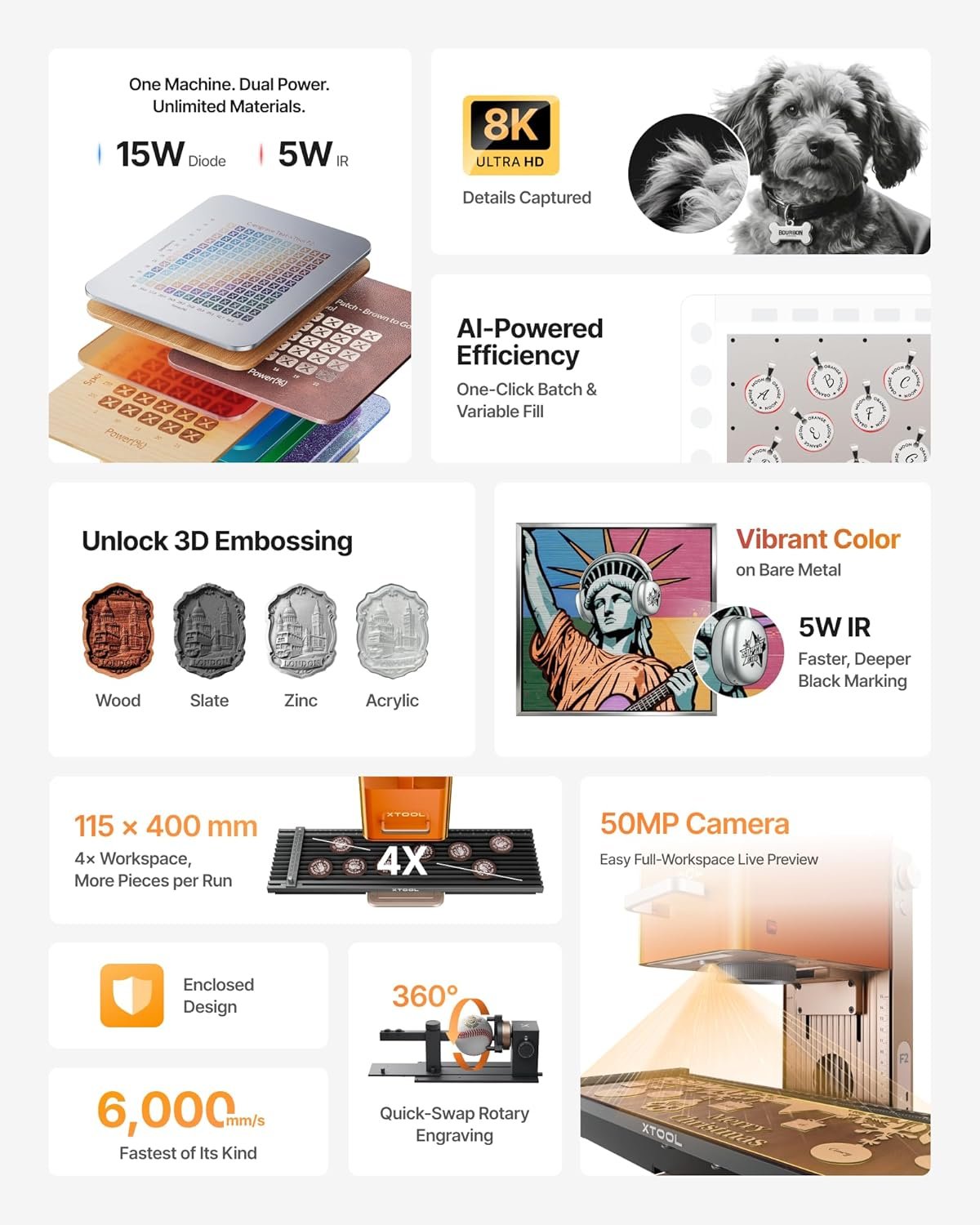
15W diode, 5W IR, 50MP camera, 6000mm/s, 4.6 kg portable |
|
|
Best for Acrylic and Large Projects
4
 |
xTool P2S 55W CO2 |
55W CO2, 26×14 bed, dual 16MP cameras, auto-passthrough, Class 4 |
|
|
Best Premium
5
 |
xTool F2 Ultra Dual Laser |
60W MOPA fiber, 40W diode, dual 48MP cameras, 15000mm/s, Class 4 |
Detailed Reviews
1. xTool M2 20W Color Craft – Best All-Round Craft Machine
Amazon rating: 4.3/5 from 39 ratings (at time of writing).
The xTool M2 20W bundles a 20W diode laser with a CMYK inkjet module and the RA3 Lite rotary in one enclosed chassis. According to the listing, the print-to-cut workflow covers 300+ materials including cardstock, felt, leather, wood and paper, so you can print full-color artwork and then cut or engrave the same piece in a single setup. Dual cameras provide a real-time preview of the workspace, and xTool’s ACS system pairs that vision with motion control for a place-and-go workflow.
The 20W module is the entry point of the M2 line, and the listing notes you can swap in a 3W IR module (sold separately) for finer work. xTool Studio includes hundreds of templates and an AI image generator, which buyers report makes the learning curve gentle for gift and decor projects. The enclosure is rated Class 1, and the laser output is listed at 20,000mW.
With a 4.3-star average across 39 ratings, feedback is limited but positive. Buyers report the color-plus-laser combination is the draw here: it suits stickers, personalized gifts and small batch craft sales rather than heavy production cutting.
2. xTool M2 40W Deluxe Bundle – Best for Higher-Power Crafting
This is the deluxe bundle of the same xTool M2 platform, configured with a 40W diode module instead of the 20W unit. According to the listing, the higher output expands material coverage to 400+ materials and supports faster batch cutting alongside the CMYK inkjet printing and RA3 Lite rotary included in the box. Everything else carries over: dual cameras, the ACS-assisted place-and-go workflow, xTool Studio templates and the Class 1 enclosed design.
The listing notes the M2 accepts 10W, 20W and 40W diode modules plus the 3W IR module (sold separately), so the platform is upgradeable over time. Laser output here is listed at 40,000mW. Because this is a configuration of the same model as the 20W version, the two share a model number, and review counts should not be read as separate performance signals.
This listing has no buyer rating yet, so there is no user feedback to weigh. On paper it is the choice for crafters who want more cutting headroom and full-color printing from one enclosed machine without stepping up to a CO2 or fiber system.
3. xTool F2 Dual Laser – Best Value
Amazon rating: 4.5/5 from 135 ratings (at time of writing).
The xTool F2 pairs a 15W diode laser with a 5W IR laser, and according to the listing that combination covers 300+ materials. The IR module is aimed at deep, dark color marking on metal, while the diode handles 3D embossing and cutting thicker stock. A built-in 50MP camera visualizes the workspace with up to 0.1mm alignment accuracy on small pieces, and the listing cites motion accuracy of 0.00199 inches.
Speed is the headline: up to 6000mm/s, with the listing claiming a card engraving in about three seconds. At roughly 4.6 kg and fully assembled out of the box, it is designed to travel to fairs, pop-ups and markets, and the enclosed leak-proof design with built-in fan supports indoor use. A Slide Extension accessory is offered for batch work on coasters and phone cases.
Buyer feedback is the strongest in this roundup at 4.5 stars across 135 ratings. Buyers report the camera-based positioning and quick setup are the practical highlights for small-batch and on-site work. Note the listing rates it Class 4, so eye protection and safe operating practice matter.
4. xTool P2S 55W CO2 – Best for Acrylic and Large Projects
Amazon rating: 4/5 from 96 ratings (at time of writing).
The xTool P2S is a 55W CO2 laser cutter and engraver built for larger stock and non-wood materials. According to the listing, it cuts all colors of acrylic up to 20mm thick and black walnut up to 18mm in a single pass, and engraves glass, ceramic, slate, coated metals and anodized aluminum. The bed measures 26 by 14 inches, Auto-Passthrough handles material up to 118 inches long, and a Riser Base accommodates objects up to 8.4 inches tall.
Dual 16MP cameras give real-time previews, and a LiDAR ranging system provides 0.001-inch autofocus. Engraving speeds reach 600mm/s, with smart fill batch processing for names, serial numbers and repeated designs. 3D curve engraving and RA2 Pro rotary compatibility (rotary sold separately) extend it to tumblers, mugs and rings. Safety features include AI fire detection, automatic lock and emergency stop, plus a 233.3 CFM exhaust fan.
At 4.0 stars across 96 ratings, buyers report solid results on acrylic and glass. It is the heaviest machine here at about 130 pounds, and the listing rates it Class 4.
5. xTool F2 Ultra Dual Laser – Best Premium
Amazon rating: 4.2/5 from 48 ratings (at time of writing).
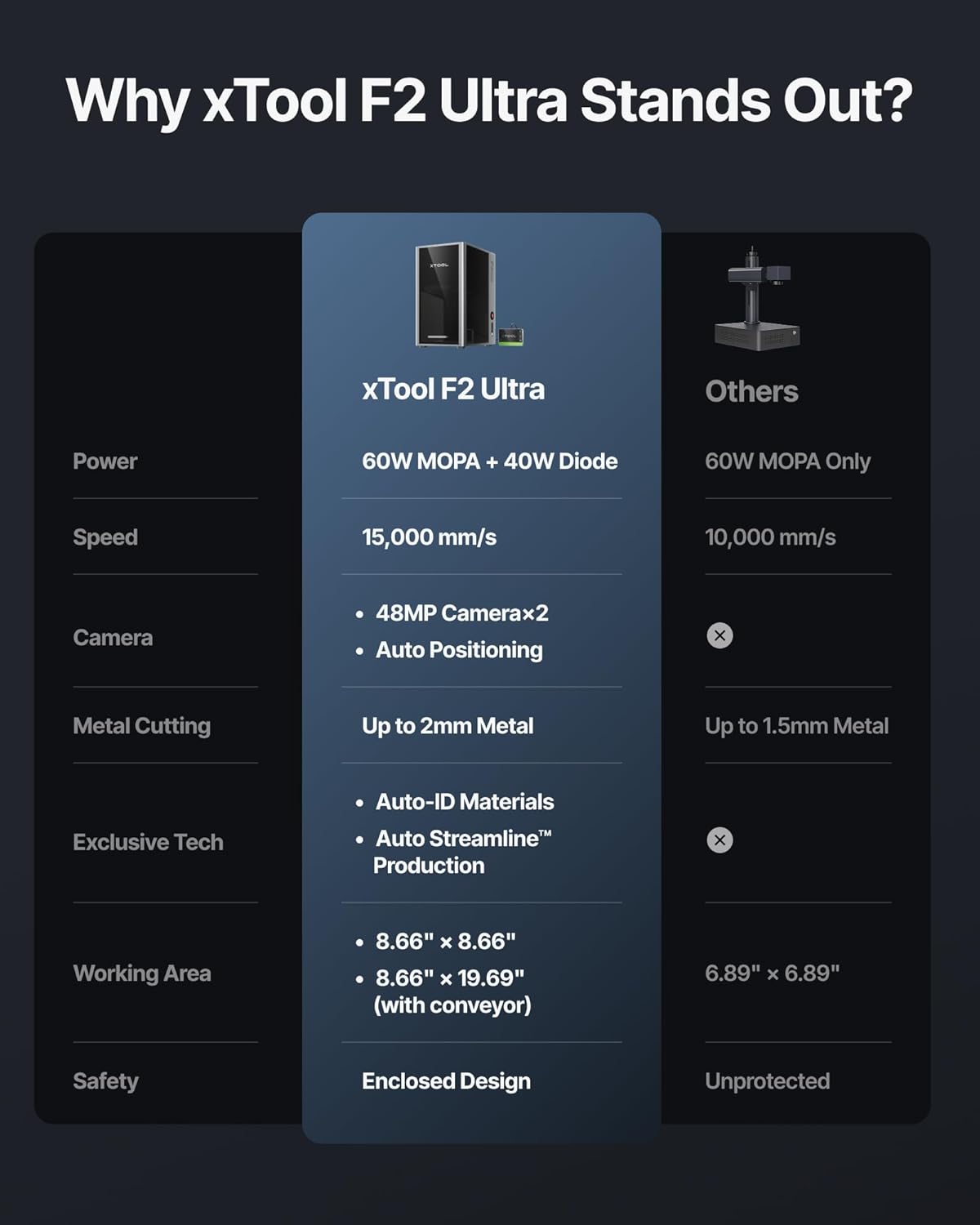
The xTool F2 Ultra is the top of this lineup, combining a 60W MOPA fiber laser with a 40W diode laser. According to the listing, the fiber source handles all metals, including 3D embossing, deep engraving, color marking, laser cleaning, thin metal welding and cutting up to 2mm metal, while the diode side covers wood, acrylic, leather, glass, rubber and fabric, cutting up to 20mm acrylic and 23mm wood.
The MOPA module is claimed to produce 100+ consistent colors on metals using preset color files, removing much of the trial-and-error usually associated with color marking. Dual 48MP AI cameras raise positioning accuracy to 0.2mm, auto-detect materials and suggest settings, and the working area of 8.7 by 8.7 inches expands to 8.7 by 19.7 inches with the optional auto conveyor. Speeds reach 15,000mm/s, with the listing claiming up to 80% less time on 3D embossing than a 20W fiber laser.
Buyers give it 4.2 stars across 48 ratings. It is the highest-priced machine here and is rated Class 4, so it best suits a dedicated workspace or a business doing metal personalization.
Buying Guide: Choosing the Best Laser Engraver
Start With Your Materials
The single biggest decision is what you want to engrave. Diode lasers, like those in the xTool M2 and the diode side of the F2, are well suited to wood, leather, felt, paper and cardstock. CO2 machines such as the P2S add acrylic, glass, ceramic and slate. If bare metal marking or color engraving on stainless steel and brass is the goal, a fiber or MOPA source like the F2 Ultra is the relevant category. Match the machine to the material list first, then compare power.
Power and Speed Trade-offs
Higher wattage generally means faster cutting and more headroom on thick stock, but it is not the whole story. The M2’s 20W and 40W modules sit on the same platform, and the listing claims the 40W version covers more materials and faster batch work. The F2 prioritizes speed and portability with a 15W diode and 5W IR pairing, while the P2S uses 55W of CO2 power for thick acrylic in a single pass. Consider how often you will cut versus engrave; engraving detail often depends more on optics and motion accuracy than raw wattage.
Safety Class and Ventilation
Laser classes matter at home. The M2 models are listed as Class 1 enclosed machines, which is the friendliest option for a family home. The F2, P2S and F2 Ultra are listed as Class 4, meaning direct exposure is hazardous and ventilation, interlocks and protective practice are essential. If you plan to work indoors near family, an enclosed Class 1 design or a well-ventilated dedicated room should shape your shortlist.
Software and Workflow
Beginner-friendly software shortens the path from idea to finished product. xTool Studio, cited across these listings, includes templates and an AI image generator, and camera systems on the M2, F2 and P2S support visual placement so you waste less material. For a small business, batch features like smart fill and passthrough or conveyor options matter more than template libraries.
Footprint, Portability and Support
FAQ
What is the best laser engraver for a home workshop?
For most homes, an enclosed Class 1 machine like the xTool M2 is the easiest to live with, since it combines laser work with CMYK printing and ships with a rotary accessory. If you mainly need portability and metal marking, the Class 4 xTool F2 is smaller and faster but requires stricter safety practice.
Can these laser engravers cut metal?
According to the listings, the F2 Ultra’s 60W MOPA fiber laser cuts up to 2mm metal and handles deep engraving and color marking on metals. The F2’s 5W IR laser is described for color marking on metal rather than cutting. Diode and CO2 models are aimed at wood, acrylic, leather, glass and similar materials.
Do I need ventilation for a laser engraver?
Yes for Class 4 machines like the F2, P2S and F2 Ultra, which the listings describe with exhaust fans and, in the P2S case, a 233.3 CFM fan. The M2 is listed as a Class 1 enclosed design, but venting fumes from leather, acrylic and coated materials is still sensible in any indoor workspace.
What is the difference between the two xTool M2 listings?
They are configurations of the same M2 platform. One bundles a 20W diode module with the CMYK inkjet module and RA3 Lite rotary and is listed for 300+ materials; the other bundles a 40W diode module with the same accessories and is listed for 400+ materials. They share a model number, so review counts should not be compared as if they were separate machines.
Which model suits a small business doing personalized gifts?
The M2’s print-to-cut workflow suits full-color gifts and stickers, while the F2’s speed and camera alignment favor on-site personalization at markets. For acrylic signage and larger runs, the P2S offers a bigger bed and batch processing, and the F2 Ultra targets metal-focused businesses.
Final Verdict
The Verdict: Best Laser Engraver in 2026
The best laser engraver overall for a home crafter or small gift business is the xTool M2 20W, which pairs a Class 1 enclosed design with CMYK printing and a rotary accessory in one setup. Step up to the 40W M2 bundle if you need more cutting headroom. For portability, speed and metal marking, the F2 is the value pick and carries the strongest buyer rating in this group.Choose the P2S if acrylic and large-format work define your business, and the F2 Ultra if color marking and deep engraving on metal justify the highest price. In every case, confirm the laser class, ventilation needs and material list against the manufacturer listing before you buy.


